
Real-Time Translation for Sales Calls: Practical Workflow and Limits
You have a sales call in 30 minutes with a prospect who speaks limited English. You need to understand their questions and respond clearly. Real-time translation tools can help, but they have limits that affect how you prepare and run the call.
This article covers practical workflows for using real-time translation during sales calls, what current tools can and cannot do, and how to set expectations so the technology helps rather than hinders the conversation.
The Reality of Real-Time Translation on Calls
Real-time translation for live conversations is not the same as translating a document. In a document, the AI has the full text available and can process it in context. On a live call, the AI is working with spoken audio, recognizing speech, translating it, and presenting the output — all within seconds.
This means real-time translation on calls involves three steps, each with potential errors:
- Speech recognition: Converting spoken audio to text. Accuracy depends on accent, speaking speed, background noise, and microphone quality.
- Translation: Converting the recognized text to the target language. Accuracy depends on context, terminology, and sentence complexity.
- Delivery: Presenting the translation to you as text on screen or as spoken audio through text-to-speech.
Each step introduces delay and potential for error. The output you receive is useful but approximate. Understanding this helps you use it effectively rather than expecting interpretation-grade accuracy.
Tool Options for Sales Call Translation
Built-In Meeting Platform Features
Major meeting platforms offer real-time translated captions:
- Zoom provides translated captions that display speech as translated text on screen. Availability depends on the Zoom plan and the language pair.
- Microsoft Teams offers live translated captions during meetings and calls.
- Google Meet includes translated captions for supported language pairs.
Source: https://support.zoom.com/hc/en/article?id=zm_kb&sysparm_article=KB0059081
Source: https://learn.microsoft.com/en-us/microsoftteams/meeting-transcription-captions
Source: https://support.google.com/meet/answer/10964115?co=GENIE.Platform%3DDesktop&hl=en
These features are the easiest to use because they are built into the platform. The translation appears as captions on screen, and you do not need to install additional software.
Limitations: The translation is text-only (no spoken output), accuracy varies by language pair and audio quality, and the features may not be available on all plan levels. Check your platform's current documentation for supported languages and plan requirements.
Desktop Translation Apps
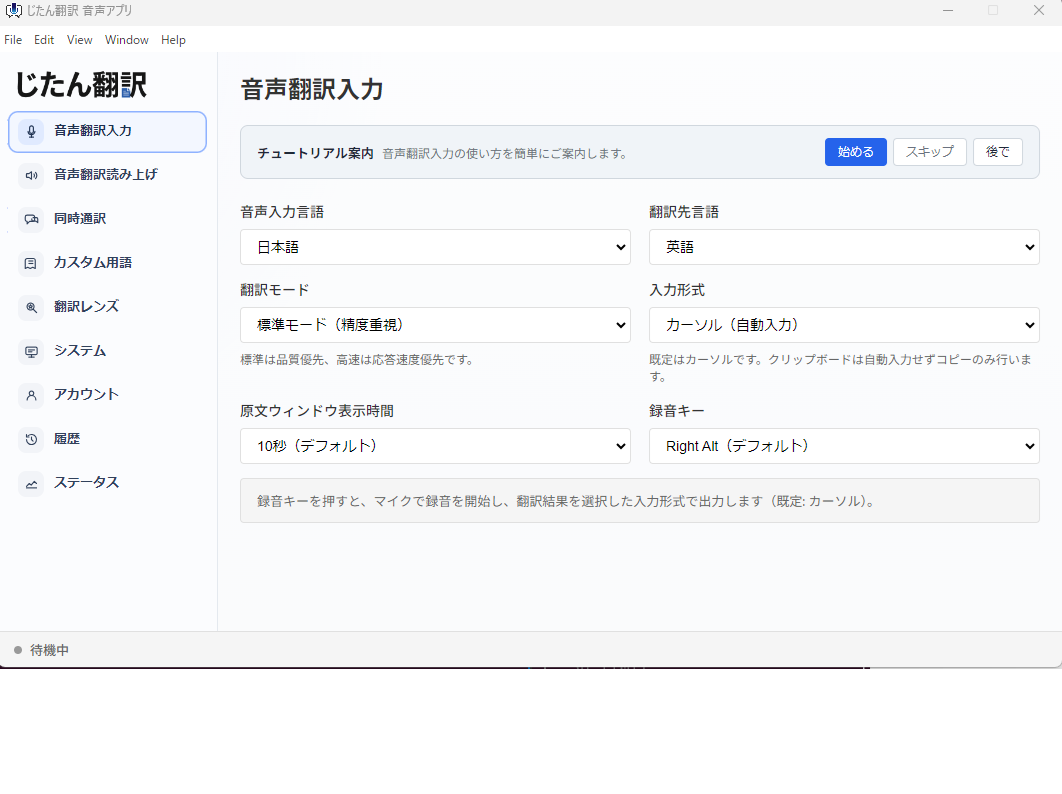
Desktop translation apps run alongside your meeting platform and capture system audio. They provide real-time translation through a separate interface.
How this works in practice:
- Start your meeting on Zoom, Teams, Google Meet, or any other platform.
- Run the desktop translation app on your computer.
- The app captures the meeting audio, recognizes the speech, translates it, and displays the translation in its own window.
- Some apps also provide spoken translation using text-to-speech.
The advantage of desktop apps is platform independence. The same tool works across all meeting platforms, so you do not need to learn different caption features for each one. Tools like Jitan Translate's voice translation feature work with any meeting platform by capturing computer audio. Multiple language pairs are supported; check the app for current availability.
Source: https://jitantranslate.com/en/blog/voice-translation/real-time-translation-zoom-teams-google-meet/
Limitations: You need to position the translation window where you can see it during the call. The translation depends on audio quality — if the prospect is on a poor connection, the speech recognition degrades.
Meeting Bots
Third-party bots can join your meeting as a participant, capture the audio, and provide translation. Some display captions within the meeting window; others require a separate browser window.
Considerations: Meeting bots appear as a participant on the call, which your prospect may find unusual. The bot also processes your audio through an external service, so evaluate the data handling practices of the bot provider. For sales calls where you are discussing pricing, deal terms, or proprietary information, consider whether you are comfortable with a third-party bot hearing the conversation.
The FTC provides guidance on evaluating vendor security practices for third-party services that handle business data, which applies to meeting bot providers as well.
Source: https://www.ftc.gov/business-guidance/small-businesses/cybersecurity/vendor-security
Human Interpreters
For high-value deals where accuracy is critical, a human interpreter remains the most reliable option. Some meeting platforms have built-in interpretation features that allow an interpreter to provide simultaneous interpretation through a dedicated audio channel.
Microsoft Teams offers an Interpreter feature that provides real-time interpretation during meetings and calls, allowing participants to speak and listen in their preferred language.
Source: https://support.microsoft.com/en-us/office/interpreter-in-microsoft-teams-meetings-and-calls-c7efe2bb-535d-42ab-a5c4-d2d91619b46d
Human interpretation is appropriate for enterprise sales, complex negotiations, and any situation where a mistranslation could affect deal terms or the business relationship.
Setting Up for a Translated Sales Call
Before the Call
- Test your setup. Run a test call with a colleague using the same translation tool and meeting platform you plan to use. Verify that the translation appears, that the delay is acceptable, and that you can read the output while still paying attention to the conversation.
- Prepare a glossary. Sales calls use specific terminology: product names, pricing terms, deal structures, technical specifications. If your translation tool supports custom glossaries, load one before the call. If not, have a reference sheet nearby so you can mentally verify key terms.
- Inform the prospect. Let the prospect know you will be using real-time translation. This sets expectations and prevents confusion when you pause to read translations. Most international prospects appreciate the effort to communicate in their language, even through AI assistance.
- Prepare bilingual materials. If you are sharing slides or documents during the call, have translated versions ready. Real-time translation handles conversation, but shared materials need to be translated in advance. AI-assisted document translation can help you generate these drafts quickly.
- Plan your talking points. Know the key messages you need to communicate and the questions you need to ask. Structured talking points translate more reliably than improvised conversation because they tend to use clearer sentence structure.
During the Call
- Speak clearly and at a moderate pace. Real-time translation accuracy degrades with fast speech, mumbling, and complex sentence structures. Use short, direct sentences. Pause between thoughts to give the translation system time to process.
- Avoid jargon and idioms. Phrases like "let's touch base," "we'll circle back," and "low-hanging fruit" do not translate well. Use plain language: "let's discuss this later," "we'll return to this topic," "easy to achieve."
- Confirm understanding. Periodically summarize what you heard and confirm with the prospect. "So you're saying you need delivery within 60 days — is that correct?" This catches translation misunderstandings early.
- Watch for lag. Real-time translation is not instantaneous. There is a delay between when the person speaks and when you see the translation. Do not respond to what you think they said before the translation appears.
- Use text for critical information. For numbers, dates, specifications, and anything that must be exact, put it in writing. Send a follow-up email after the call confirming the key points in both languages. This provides a reference that both parties can verify.
- Be transparent about the translation. If something does not seem right, say so. "I want to make sure I understood that correctly — could you rephrase?" This normalizes the imperfect nature of real-time translation and shows the prospect you are committed to accurate communication.
After the Call
- Send a summary email. Write a summary of the key discussion points and decisions in both languages. This corrects any misunderstandings from the live translation and creates a written record.
- Follow up with translated documents. If the call discussed specific products, pricing, or terms, send the relevant documents in the prospect's language. Use document translation for this — it produces more accurate results than live speech translation.
- Note translation issues. If certain terms or phrases consistently translated incorrectly during the call, add them to your glossary or avoid them in future calls.
- Evaluate the experience. Did the translation tool perform adequately for this type of call? Were there moments where the conversation stalled because of translation problems? Use this feedback to decide whether to use the same approach for the next call with this prospect.
What Real-Time Translation Handles Well on Sales Calls
- Understanding questions and concerns: Getting the gist of what the prospect is asking, even if the translation is not perfect.
- General conversation: Introductions, scheduling, relationship-building topics translate reasonably well.
- Identifying key topics: Even with imperfect translation, you can usually tell when the prospect is asking about pricing, timeline, features, or support.
- Building rapport: Making the effort to communicate in the prospect's language, even through AI assistance, demonstrates respect and commitment.
What Real-Time Translation Struggles With on Sales Calls
- Precise numbers and terms: Currency amounts, dates, quantities, and technical specifications may be transcribed or translated incorrectly. Always confirm these in writing.
- Nuanced negotiation language: Hedges, conditions, and subtle deal terms may not translate accurately. If the prospect says something that seems too good to be true, verify — the translation may have softened a condition.
- Fast back-and-forth: Rapid exchanges, interruptions, and overlapping speech confuse speech recognition and produce garbled translation.
- Cultural context: Tone, formality, and indirect communication patterns do not translate. The prospect may be expressing polite hesitation that the translation renders as a neutral statement.
When to Escalate to a Human Interpreter
Consider using a human interpreter when:
- The deal value justifies the additional cost
- The negotiation involves complex terms or legal language
- The prospect's communication style relies heavily on nuance and indirectness
- Previous calls with AI translation resulted in misunderstandings
- The prospect specifically requests an interpreter
- The call involves contract terms that could have legal implications
AI-assisted translation is a practical tool for many sales conversations. It is not a replacement for human interpretation in high-stakes situations. Use it as a productivity tool for initial conversations, qualification calls, and follow-up discussions. For deal-closing conversations and complex negotiations, invest in human interpretation.
Preparing Your Team
If your sales team regularly calls international prospects, create a standard process:
- Tool setup guide: Document how to configure the translation tool for each meeting platform your team uses.
- Glossary: Maintain a shared glossary of product names, pricing terms, and industry jargon that maps to each target language.
- Call preparation checklist: Include steps like testing the translation setup, informing the prospect, and preparing bilingual materials.
- Follow-up template: A bilingual email template for post-call summaries with sections for key discussion points, action items, and next steps.
- Escalation criteria: Clear guidelines for when a sales rep should request a human interpreter rather than relying on AI translation.
This standardization ensures consistent quality across your sales team and reduces the risk of individual team members encountering avoidable problems. It also makes onboarding new team members faster because the translation workflow is documented rather than learned by trial and error.
Disclosure and Privacy Considerations
When using real-time translation on sales calls, be mindful of privacy:
- Inform the prospect that you are using translation technology. Transparency builds trust.
- Understand your tool's data handling: Know whether the audio is processed by a cloud service and what happens to the data after the call. Review the tool's privacy policy.
- Avoid sharing sensitive information through AI translation that you would not want processed by a third-party service. This includes proprietary product details, pricing strategies, and confidential deal terms if your tool routes audio through external servers.
- Check company policies: Some organizations have policies about using AI tools during client-facing calls. Confirm with your compliance team if applicable.