
Your team just translated a 120-page product manual using an AI engine. The output is good but not perfect. Now what? That "now what" is machine translation post-editing, and how your team handles it determines whether the final document reads like a professional publication or a rough draft.
Post-editing is not just proofreading. It is a structured process with defined quality levels, specific techniques, and a feedback loop that makes every future translation better. This guide covers how to set up that process for your team.
What Is Machine Translation Post-Editing?
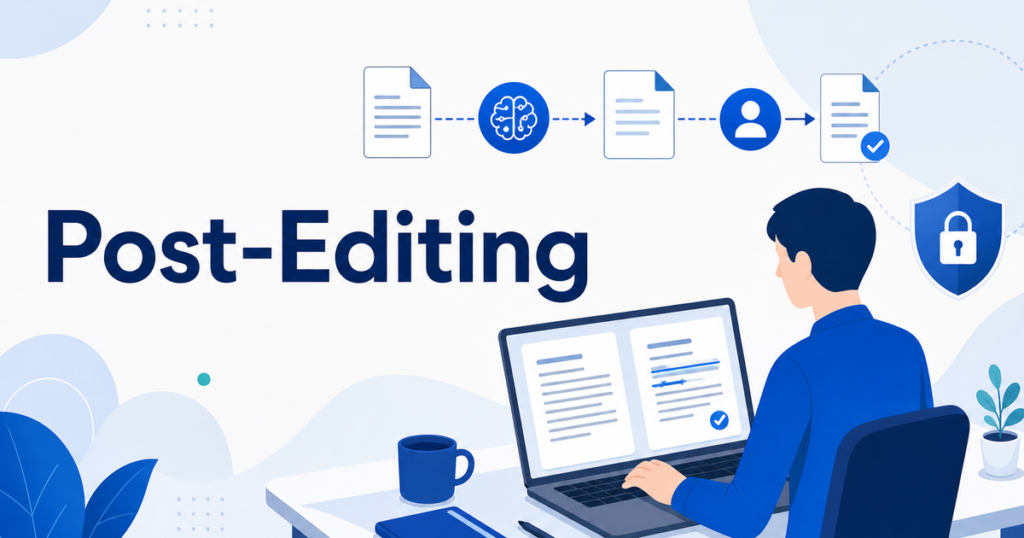
Machine translation post-editing (MTPE) is the process of reviewing and correcting the output of a machine translation engine. A human editor reads through the translated text, fixes errors, improves fluency, and ensures the content meets the quality standard your organization requires.
MTPE sits between two extremes: publishing raw machine translation without review (risky) and translating everything from scratch with human translators (expensive and slow). It captures most of the speed and cost benefits of AI while adding a human quality layer where it matters.
Two Levels of Post-Editing
The translation industry recognizes two distinct levels of post-editing. Choosing the right level for each project is the first step in building an efficient workflow.
Light Post-Editing
Light post-editing focuses on fixing errors that affect comprehension. The editor corrects mistranslations, removes nonsensical output, fixes grammar mistakes that change the meaning, and ensures the text is understandable.
The goal is not perfection. It is usability. The output may not read like it was originally written in the target language, but it will be accurate enough for its intended purpose.
Light post-editing is appropriate for internal documents, reference materials, technical specifications used by subject matter experts, and any content where the reader can work around minor awkwardness.
Full Post-Editing
Full post-editing aims for quality comparable to human translation. The editor corrects all errors, improves fluency and style, ensures cultural appropriateness, and polishes the text to read naturally.
This level takes more time and costs more, but it produces output suitable for external publication, customer-facing content, marketing materials, and any document that represents your brand.
Full post-editing is appropriate for client proposals, published reports, marketing content, legal and compliance documents, and anything going to an external audience.
Building a Post-Editing Workflow
A good post-editing workflow is systematic, not ad hoc. Here is how to set one up.
Step 1: Define Quality Standards
Before anyone starts editing, agree on what "done" looks like. Write down your quality criteria. For light post-editing, that might be "no errors that change meaning, all technical terms correct, readable sentences." For full post-editing, add "natural phrasing, consistent style, culturally appropriate."
Share these standards with everyone who will edit translations. Consistency requires a shared definition of quality.
Step 2: Create and Maintain a Glossary
A glossary is a list of terms with their approved translations. Product names, technical terms, industry jargon, brand-specific language — every term that should be translated the same way every time goes in the glossary.
Give the glossary to both the AI engine (many support custom terminology) and the human editors. When an editor sees a term that is wrong, they correct it in the document and update the glossary. Over time, the glossary reduces the number of corrections needed because the AI engine learns from it.
If you are using DeepL, you can set up multilingual glossaries that apply to every translation. Azure AI Translator and Google Cloud Translation both support custom glossaries as well. These are not optional extras. They are essential tools for consistent output.
Step 3: Establish a Review Cycle
Define who reviews what. For a small team, one editor might handle everything. For larger organizations, you might have subject matter experts check technical accuracy and language specialists check fluency.
Build review time into your project timelines. Post-editing is faster than full translation, but it still takes time. A reasonable estimate for light post-editing is 2,000-3,000 words per hour for an experienced editor. Full post-editing is closer to 1,000-1,500 words per hour.
Step 4: Track and Categorize Errors
When editors find errors, categorize them. Common categories include:
- Accuracy errors: The translation conveys the wrong meaning.
- Terminology errors: A glossary term was translated incorrectly.
- Fluency errors: The text is understandable but awkward.
- Omissions: Content from the source was left out.
- Additions: Content was added that was not in the source.
Tracking error categories reveals patterns. If 60 percent of errors are terminology-related, your glossary needs work. If most errors are fluency issues, the AI engine may need better input preprocessing.
The Glossary Feedback Loop
The glossary is not a one-time setup. It is a living document that improves over time through a feedback loop.
How the Loop Works
- AI translates a document using the current glossary.
- A human editor reviews the output and identifies terminology errors.
- The editor corrects the errors in the document and adds new entries to the glossary.
- The updated glossary is applied to the next translation.
- Repeat.
Each cycle reduces the terminology error rate. After dozens of documents, the glossary becomes a powerful asset that significantly improves both AI and human translation quality.
Tips for Effective Glossary Management
- Assign one person as the glossary owner. Multiple people editing the same glossary leads to contradictions.
- Review the glossary quarterly. Terms change, products get renamed, and some entries become obsolete.
- Include context notes. A term might be translated differently depending on whether it appears in a UI, a marketing document, or a technical specification.
- Version your glossary. Keep a record of changes so you can trace when and why a term was updated.
Tools for Post-Editing Teams
Translation Environment Tools
Professional translation tools — often called translation management systems or TMS — include features designed specifically for post-editing. They display the source and translation side by side, highlight changes, track edit history, and integrate with glossaries and translation memories.
Popular options include Phrase, Trados, MemoQ, and Smartcat. These tools are worth the investment if your team processes more than a handful of translated documents per month.
Document Translation Platforms
For teams that do not need full TMS complexity, document translation platforms like Jitan Translate provide a simpler workflow. Upload a file, get a translated version back designed to preserve the layout, then open it in your standard editing tools to make corrections.
This approach works well for teams whose editors are subject matter experts rather than professional translators. They can review and correct the translation in familiar tools like Word or PowerPoint without learning a new platform.
Version Control for Translated Documents
Translated documents go through multiple versions: the AI output, the post-edited version, and potentially further revisions. Use a clear naming convention or a document management system to track versions. Nothing wastes time faster than editing the wrong version of a file.
Common Mistakes in Post-Editing Workflows
Over-Editing Light Post-Editing
When an editor is asked to do light post-editing but treats it like full post-editing, the cost and time savings disappear. Light post-editing should focus on accuracy, not style. Train editors to match their effort to the agreed quality level.
Under-Editing Full Post-Editing
The opposite problem: an editor treats a full post-editing task like light post-editing, leaving fluency issues and awkward phrasing. This usually happens when timelines are tight or the editor is not given enough time. Build realistic timelines for full post-editing.
Skipping the Feedback Loop
If editors correct errors but do not update the glossary, the same errors will appear in the next translation. The feedback loop is what makes post-editing efficient over time. Skipping it means you are paying editors to fix the same problems repeatedly.
No Quality Standards
Without written quality standards, every editor applies their own judgment. One editor's "good enough" is another editor's "needs rewriting." Written standards align the team and produce consistent results.
Measuring Post-Editing Effectiveness
How do you know if your post-editing process is working? Track a few key metrics:
- Edit distance: How much of the AI output does the editor change? A declining edit distance over time means the AI output is improving (often because of glossary improvements).
- Error rate by category: Are terminology errors decreasing? Fluency errors? This tells you where to focus improvement efforts.
- Reviewer time per word: Is post-editing getting faster? It should, as the glossary improves and editors become familiar with common AI output patterns.
- Stakeholder satisfaction: Ask the people who use the translated documents. Do they find errors that the post-editing process missed? Their feedback is the ultimate quality check.
Scaling the Process
As your translation volume grows, post-editing needs to scale too. Here are strategies for handling more volume without proportionally more editors.
- Tier your content: Not everything needs the same quality level. Classify documents by risk and visibility, and apply light or full post-editing accordingly.
- Automate glossary checks: Some tools can automatically flag text that does not match glossary entries, reducing the manual checking editors need to do.
- Build an editor pool: Have multiple editors trained on your standards and glossary so you can handle volume spikes.
- Use AI-assisted editing: Some modern tools suggest corrections to editors, speeding up the review process.
Training Your Post-Editing Team
Not everyone is a good post-editor. The skill is different from both translation and proofreading. A good post-editor needs to read fluently in both languages, spot accuracy errors quickly, resist the urge to stylistically rewrite acceptable sentences, and work efficiently at scale.
Hiring vs Upskilling
If you have bilingual team members, they can often learn post-editing with targeted training. Run a two-hour workshop where you walk through sample AI translations, identify errors together, and practice the distinction between what must be fixed (accuracy) and what can be left alone (style preference).
If you need to hire, look for people with professional translation backgrounds who are comfortable working with AI output. Experienced translators sometimes resist post-editing because it feels like correcting someone else's work. Emphasize that post-editing is a distinct skill and a growing specialization in the industry.
Calibration Exercises
After initial training, run calibration exercises. Give the same AI-translated document to all your editors and have them mark it up independently. Then compare results. Where editors disagree, discuss and agree on the right approach. These exercises align the team's judgment and build shared quality standards faster than any style guide.
Ongoing Quality Monitoring
Even after training, monitor quality periodically. Spot-check edited documents, measure edit distance across editors, and review the glossary updates each editor submits. This catches drift — the tendency for editors to gradually become more or less rigorous over time — and keeps the team aligned.
Getting Started
If your team is new to post-editing, start small. Pick one document type, create a basic glossary, run it through AI translation, and have one editor do a light post-edit. Measure the time it takes and the quality of the result. Then iterate.
The first few rounds will feel slow as you build the glossary and calibrate your quality standards. By the tenth document, you will have a workflow that is significantly faster and more consistent than when you started.
For AI document translation that produces clean output ready for post-editing, check out how PDF translation works with layout preservation — the same principles apply to all Office file formats.